
BLOG
2026/08/11Clicks:392
The performance of a liquid cooling system depends not only on the selection of cooling equipment but also on the quality of installation.
In AI data centers, liquid cooling hoses connect critical components including:
Although the hose itself may represent a small part of the overall cooling infrastructure, improper installation can significantly affect:
Common installation problems include:
A properly installed liquid cooling hose helps ensure stable coolant circulation and long-term operation of AI infrastructure.
A typical AI liquid cooling loop:
CDU

↓

Supply Hose

↓

Rack Manifold

↓

GPU Cold Plate

↓

Return Hose

↓

CDU
The hose must maintain:
Installation quality directly influences system performance.
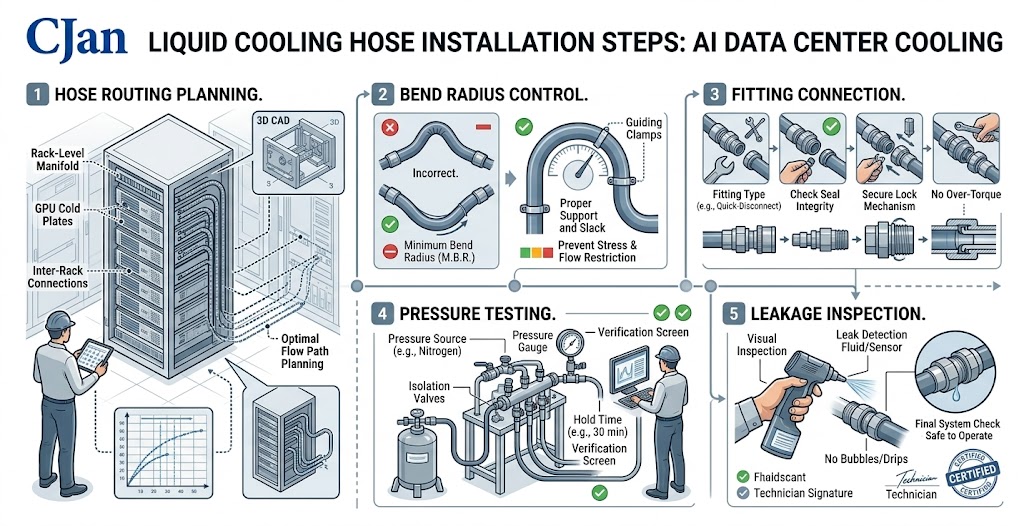
One of the most important steps is planning the hose layout before physical installation.
Engineers should evaluate:
Poor routing may create unnecessary stress on the hose assembly.
A well-designed hose route should:
Minimize sharp bends
Avoid unnecessary length
Prevent contact with sharp edges
Allow easy maintenance access
Reduce stress on fittings
Avoid:
These conditions may shorten hose service life.
Every liquid cooling hose has a recommended minimum bend radius.
The bend radius represents the smallest curve the hose can safely withstand.
Exceeding this limit may cause:
A hose that is forced into a tight curve may experience:
During installation:
The hose should naturally follow the required path instead of being forced into position.
Twisting is one of the most common installation mistakes.
A hose should bend along its designed direction.
Incorrect:
Connector
   |
   |
  /
 /
Twisted hose
Correct:
Connector
   |
   )
  )
Smooth bending
Twisting can create:
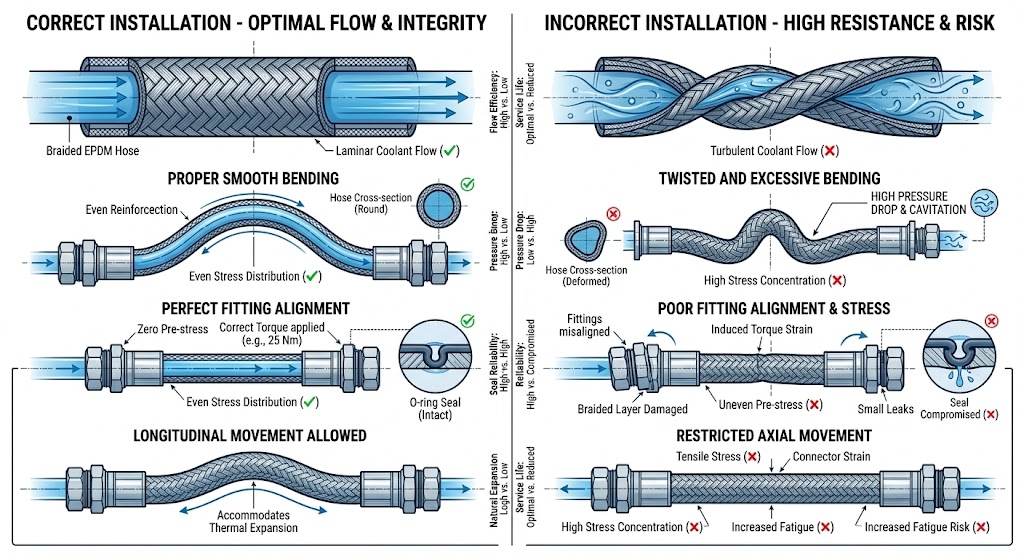
The correct hose length is a balance between flexibility and efficiency.
Too short:
Too long:
The ideal hose length allows:
The hose and fitting form one complete assembly.
Connection reliability depends on:
Common connection types include:
Before operation, confirm:
Fitting fully engaged
No visible damage
Correct torque applied
Hose not under stress
Connection alignment is correct
During installation, protect hoses from:
The outer layer protects the internal structure.
Damage during installation may not cause immediate failure but can reduce long-term reliability.
Liquid cooling systems require clean coolant circulation.
During installation:
Avoid introducing:
Recommended practices:
This is especially important for:
After installation, testing should be performed before system operation.
Typical verification includes:
Confirms hose assembly strength.
Checks:
Confirms:
AI data centers often have high-density equipment layouts.
Installation teams should consider:
Higher-density racks require optimized hose routing.
Hoses should not block:
Cooling infrastructure should support future upgrades.
Result:
Result:
Result:
Result:
Result:
A liquid cooling hose is a precision thermal management component.
| Item | Check |
|---|---|
| Hose material | Compatible with coolant |
| Hose length | Correct routing |
| Bend radius | Within specification |
| Connection | Properly installed |
| Cleanliness | No contamination |
| Pressure test | Completed |
| Leakage test | Completed |
| Flow test | Verified |
CJAN provides liquid cooling hose products designed for demanding cooling environments.
Suitable for:
Features:
Suitable for applications requiring additional safety performance.
Applications:
Designed for:
Liquid cooling hose installation is a critical part of AI data center thermal management.
A high-quality hose can only deliver reliable performance when it is installed correctly.
Key installation principles include:
As AI computing continues to increase rack power density, installation quality will become increasingly important for maintaining cooling system reliability.
A properly installed liquid cooling hose helps protect valuable computing infrastructure and supports long-term operational stability.
EPDM vs Silicone vs PTFE: Which Hose Material Is Best for Liquid Cooling?
 Mobile


 GLOBAL


